Why I run a homelab in 2026
For the better part of a decade, the industry moved everything to the cloud. Infrastructure became APIs. Servers became someone else’s problem. Most of us stopped thinking about hardware. And for good reason. Managed services are genuinely great for most workloads.
Then AI happened. Suddenly we needed GPUs again. We needed to understand inference latency, model memory footprints, and what it actually costs to run a 7B parameter model at scale. Cloud GPU instances work, but at €200+/month per card, the economics of experimentation change fast. For a lot of engineers, that sparked a quiet return to on-premise thinking, not out of nostalgia, but out of necessity.
That’s how my homelab went from a side hobby to something I actually rely on.
The setup
Nothing exotic. A Proxmox host on an ASUS PRIME X570-PRO with two RTX 3060s (12GB each), a 500GB NVMe that’s perpetually too small, and a Mac Mini M1 running lighter services. Everything sits behind a residential fiber connection in Málaga.
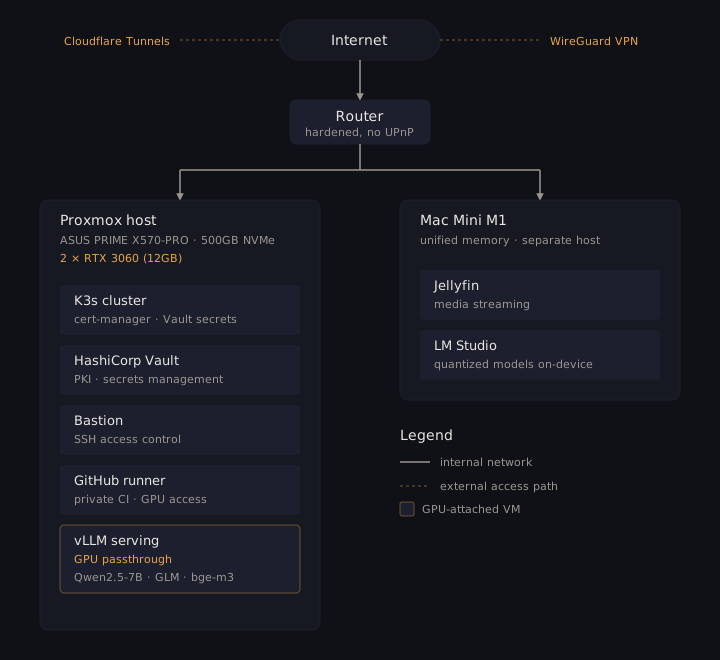
On top of Proxmox, I run a handful of VMs:
- A K3s cluster where I deploy side projects with real CI/CD, cert-manager, and Vault-managed secrets. Same patterns I use in production at work.
- A HashiCorp Vault instance for PKI automation and secrets management. I wanted to understand Vault deeply before recommending it to clients, so I run my own.
- A bastion host for SSH access control.
- A GitHub self-hosted runner for CI pipelines that need GPU access or private network reach.
The Mac Mini handles Jellyfin for media streaming and doubles as a surprisingly capable LLM workstation. LM Studio runs smaller models on the M1’s unified memory without breaking a sweat. I keep it as a separate machine from the Proxmox box.
I also run a WireGuard VPN for secure remote access to the entire lab when I’m away, and use Cloudflare Tunnels to expose specific services when port forwarding feels too risky or isn’t an option. The router itself has been through several rounds of hardening: disabling UPnP, locking down DNS, tightening firewall rules. It’s the kind of work that doesn’t make for exciting screenshots but matters more than most of what runs behind it.
Self-hosting LLMs: what I’ve actually learned
This is where the GPUs earn their electricity bill. I’ve run several models locally: Qwen2.5-7B-Instruct for natural language understanding, GLM for general-purpose tasks, bge-m3 for multilingual embeddings, and various smaller models for experimentation.
On the Proxmox side, the serving stack is vLLM, which handles paged attention and batched inference well on consumer GPUs. A typical setup:
python -m vllm.entrypoints.openai.api_server \
  --model Qwen/Qwen2.5-7B-Instruct \
  --tensor-parallel-size 1 \
  --gpu-memory-utilization 0.85 \
  --max-model-len 4096
One 12GB RTX 3060 can serve a 7B model at reasonable latency for single-user workloads. For lighter experimentation, the Mac Mini with LM Studio is surprisingly effective. Apple Silicon’s unified memory handles quantized models well, and the setup is trivial compared to configuring CUDA drivers and vLLM on Linux.
Not production-grade, but enough to prototype a full recommendation API with complexity-based routing: simpler queries hit a lightweight model, complex ones get escalated. That architecture came directly from homelab experiments before it went into a real project.
The honest takeaway: self-hosting LLMs is viable for development and prototyping. For production with real concurrency, you need either beefier hardware or a hybrid approach with cloud fallback. Knowing that from firsthand experience is worth more than reading about it.
The unglamorous parts
Most homelab content online shows the exciting moments. The new hardware, the dashboard screenshots, the architecture diagrams. Nobody talks about the Tuesday night when your K3s node won’t rejoin the cluster after a Proxmox snapshot restore, or the afternoon you lose debugging network issues between VMs that worked fine yesterday.
Some real problems I’ve dealt with:
Storage pressure is constant. A 500GB NVMe fills up fast when you’re running VMs with thick provisioning. I hit 96% disk usage and had to design a multi-tier storage strategy on the spot: NVMe for hot workloads, SATA SSD for backups, HDD for cold storage. The exercise taught me more about storage tiering than any cloud pricing calculator ever could.
# The moment you realize you have 16GB left
pvdisplay | grep "Free"
# PV Free          16.00 GiB
Network reconfiguration is humbling. When I switched ISPs, every VM and container with a static IP went dark. The new subnet meant touching every /etc/netplan/*.yaml, updating Vault’s listener address, reconfiguring the K3s API server endpoint, and rebuilding SSH trust. It took a few hours and forced me to document my entire IP allocation scheme, something I should have done from day one.
# /etc/netplan/50-cloud-init.yaml on every VM
network:
  ethernets:
    enp6s18:
      addresses:
        - 192.168.1.25/24
      routes:
        - to: default
          via: 192.168.1.1
      nameservers:
        addresses: [192.168.1.1, 8.8.8.8]
  version: 2
GPU passthrough has sharp edges. Passing RTX 3060s through to VMs on Proxmox means configuring VFIO, blacklisting the nouveau driver, and accepting that your host won’t have a display output unless you add a cheap GPU for the console. When it works, it’s seamless. When it doesn’t, you’re reading IOMMU group tables at midnight.
Thermal management is no joke. This is something most homelab guides skip entirely. In Málaga, summer means 35°C+ outside. When both GPUs are running at full load, the office turns into a furnace in minutes. Two RTX 3060s under sustained inference workloads push enough heat to raise the room temperature noticeably. I’ve had to think seriously about airflow, fan curves, and scheduling heavy GPU jobs outside peak heat hours. If you’re running serious hardware in a warm climate, cooling isn’t an afterthought. It’s infrastructure.
Why it matters professionally
I don’t run a homelab to put it on my resume. I run it because it keeps me honest.
When I design a Kubernetes platform at work, I’ve already broken a K3s cluster at home in ways that taught me what the failure modes actually look like. When I recommend Vault for secrets management, I’ve already dealt with its seal/unseal ceremony, its storage backend quirks, and its certificate renewal edge cases. When I say GPU infrastructure is hard, I’m not repeating a conference talk. I’ve configured the VFIO bindings myself.
There’s a gap between engineers who know how to use managed services and engineers who understand what those services are managing. A homelab keeps you on the right side of that gap.
It also builds a habit that I think matters more than any specific technology: the discipline of maintaining something over time. Not just setting it up once for a blog post, but keeping it updated, patched, backed up, and running. Dealing with the unglamorous reality that infrastructure is an ongoing relationship, not a one-time deployment.
The real cost
Let’s be transparent. Running a homelab isn’t free:
- Electricity: around €15-20/month for the Proxmox server running 24/7.
- Hardware: around €1,500 total over two years. GPUs, drives, and a UPS for power backup (around €100 that has already saved me from at least two outages).
- Time: A few hours per month on maintenance, more when I’m actively experimenting.
Compared to cloud equivalents (two GPU instances on any major provider would cost €200+/month), it pays for itself quickly if you actually use it. The key word is “actually”. A homelab that sits idle is just a space heater.
Starting your own
If you’re considering it, start smaller than you think you need. A single mini PC with Proxmox and one VM running K3s will teach you more in a month than most courses. Add complexity when you have a reason, not because a YouTube video made it look cool.
The best homelab is the one you actually maintain.